The merchant app, at the pass
An order board you can hear
ZMerchant runs on a phone or tablet mounted by the pass. Orders arrive with a repeating alarm that will not stop until you have dealt with them, a countdown on every one you have not accepted yet, and a kitchen ticket that keeps retrying until the printer takes it.
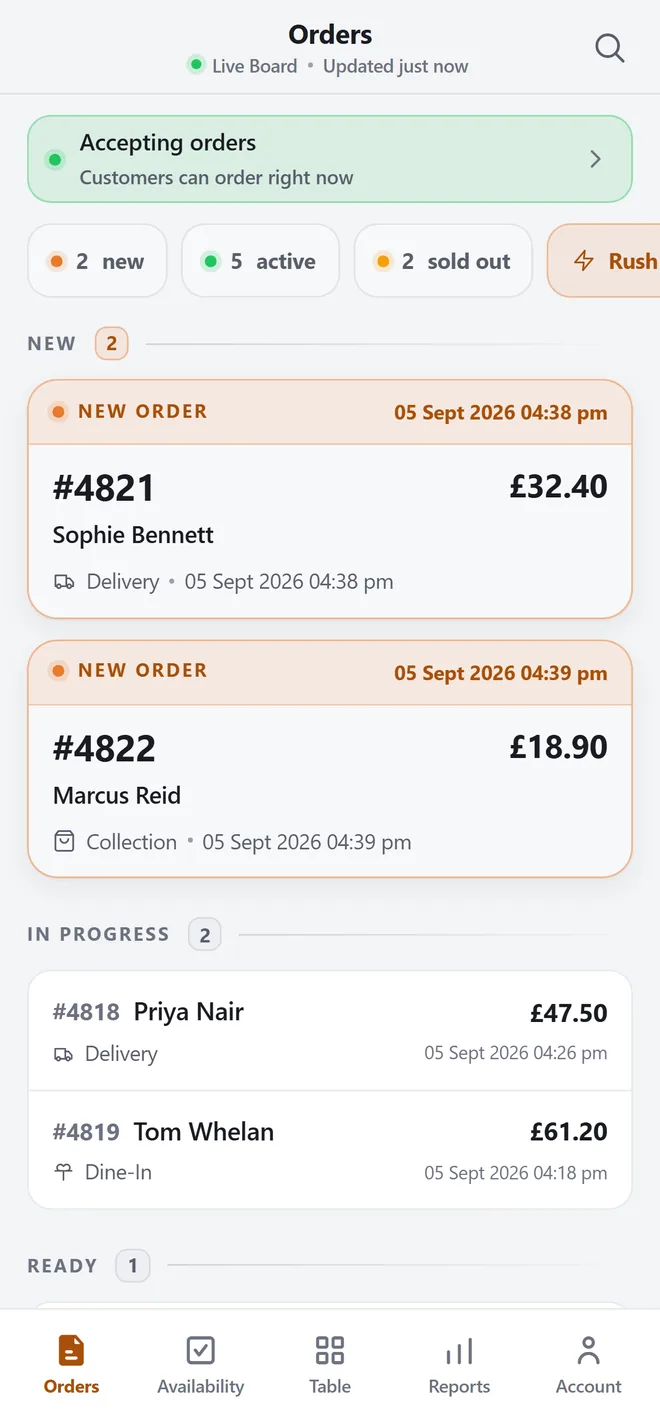
Orders is the home screen
the app opens on the board; there is no dashboard to get past first.
Oldest first
orders sort by number ascending, which is the order the kitchen works in.
Two card shapes, and only two
unaccepted orders are raised, bordered and carry buttons; accepted orders are quiet flat rows.
The core of it
Three groups, oldest first, nothing else
The app opens on the board and stays there. A status banner across the top tells you whether customers can order right now, combining what you set by hand with your opening hours — it flips on its own as the clock crosses an opening time. Under it
- 1Orders is the home screen
the app opens on the board; there is no dashboard to get past first.
- 2Oldest first
orders sort by number ascending, which is the order the kitchen works in.
- 3Two card shapes, and only two
unaccepted orders are raised, bordered and carry buttons; accepted orders are quiet flat rows.
Features
What ZMerchant does during service.
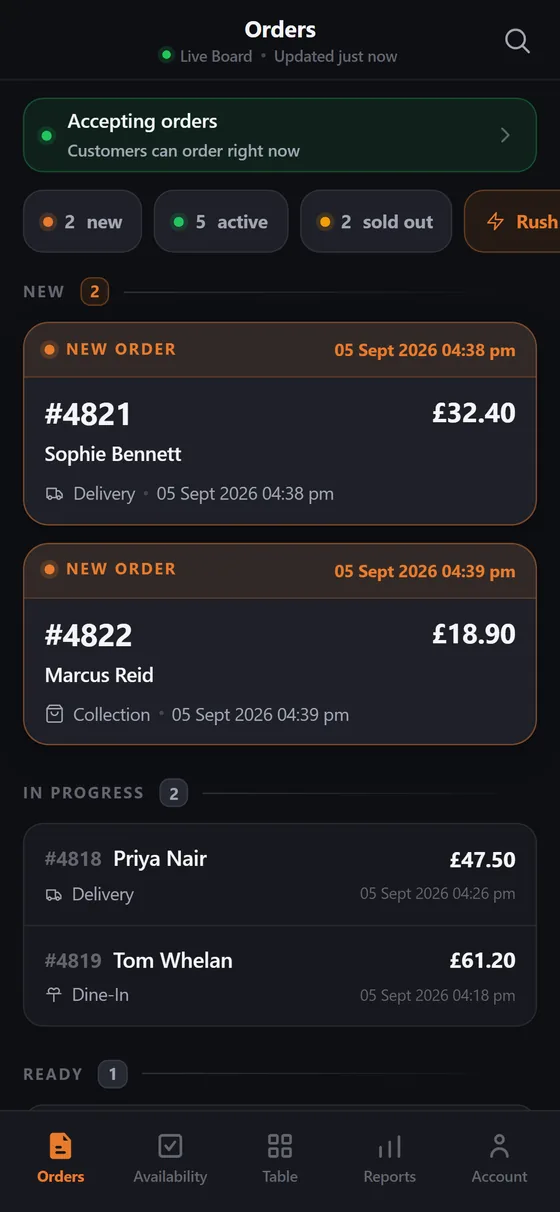
You can see which order is late
Every order you have not accepted carries a live countdown and a progress stripe showing how much of the accept window is gone. Accept it and, if you have turned the prompt on, a preparation-time sheet opens — that number is what the customer sees.
- A countdown on every new order — the time left in the accept window, with a stripe showing how far through it you are.
- Overdue is unmistakable — a negative wash behind the row and a single solid chip, with no animation to compete with the new orders.
- Prep time on accept — an optional sheet sets the estimate and starts the customer's countdown.
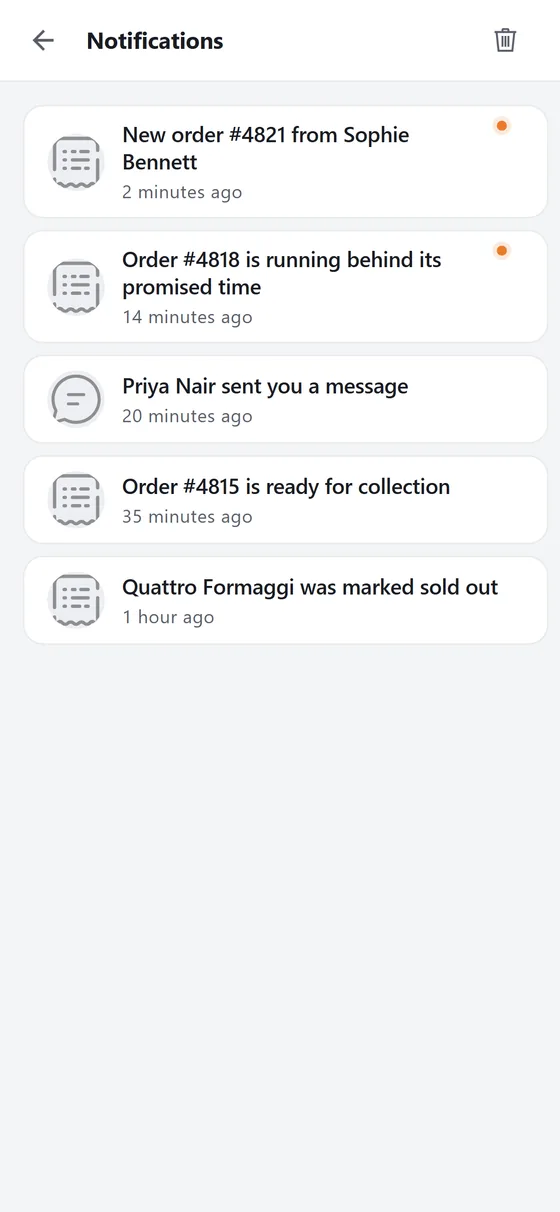
Silence is the only way to miss one
You are not looking at the screen. That assumption drives the whole alert design: a new order raises a banner, marks the card and starts a repeating alarm that sounds roughly every twenty seconds until the last new order has been handled. The alarm stops when the count reaches zero
- The alarm repeats — it keeps sounding until the last new order has been accepted or rejected.
- Three ways in — a realtime channel, a 15-second poll when realtime is off, and OS push notifications.
- It reaches a backgrounded app — the Android alert channel is created at the highest importance with its own sound, so the alert is not muffled.
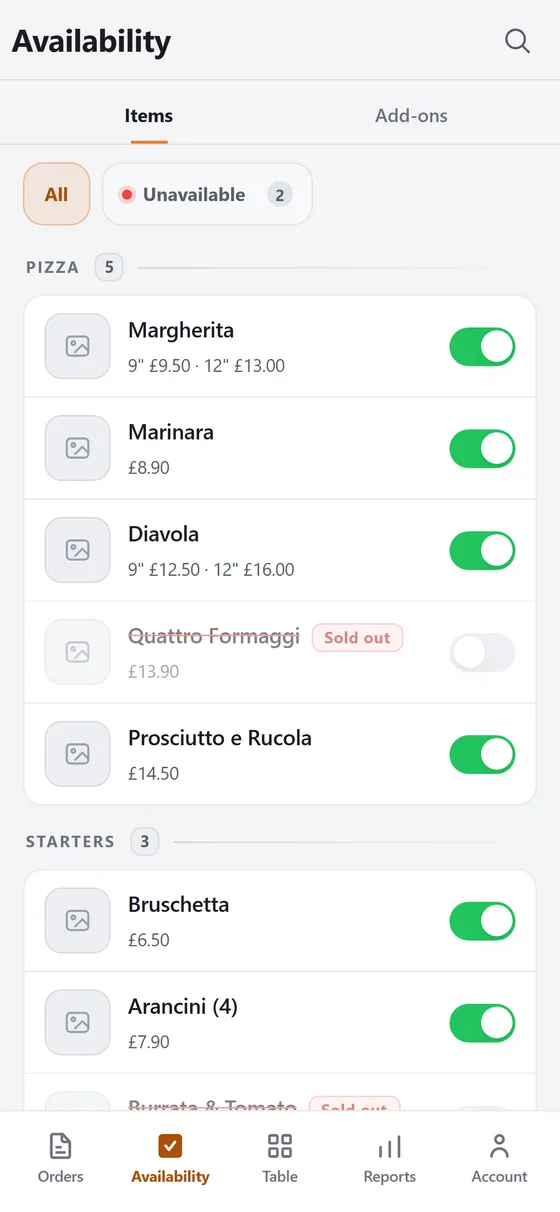
86 a dish before the next order lands
Availability has its own tab in the bottom bar, so taking a dish off is one tap from the order board rather than a trip through the menu editor. Items and add-ons are separate lists, grouped by category, each row a toggle.
- One tap from the board — availability is a bottom-bar tab, not a page buried inside menu management.
- Items and add-ons separately — a topping that has run out does not take the dish down with it.
- Sold out, not deleted — the dish stays visible to customers and unbuyable, so nothing has to be rebuilt later.
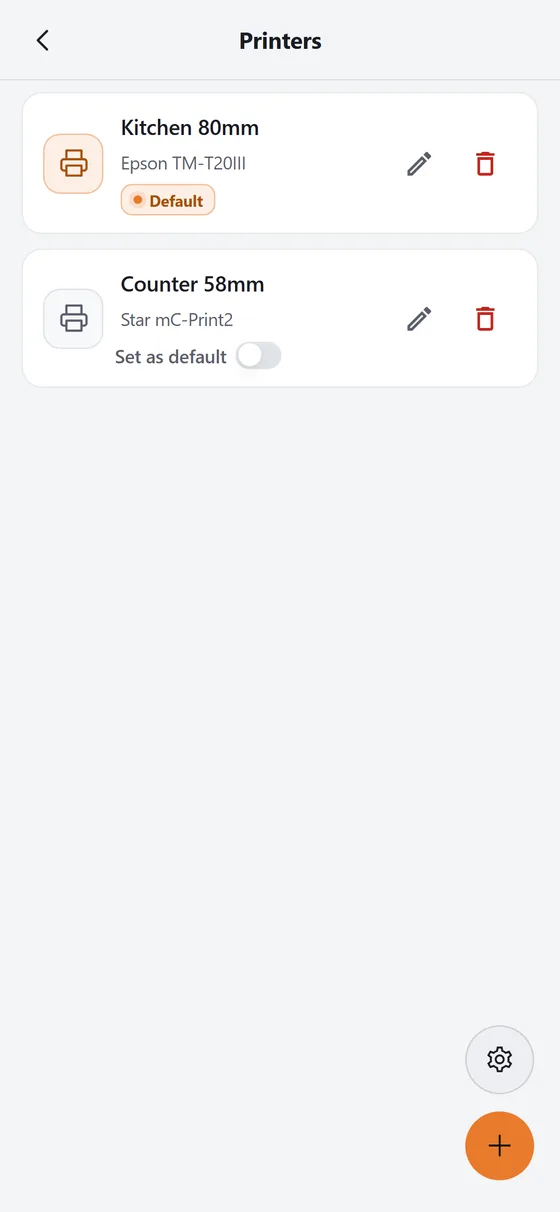
If the ticket does not print, nothing gets cooked
The kitchen ticket is the only physical output in the app, so it carries more defensive machinery than anything else. Printers are paired once from this list: a ten-second scan for Bluetooth LE, or the paired-device list for classic Bluetooth, with paper width
- Four kinds of printer — Bluetooth LE, classic Bluetooth, a Sunmi device with the printer built in, or a cloud printer the server prints to.
- Auto-print — an incoming order prints on its own, with no permission dialog thrown at you mid-service.
- Two attempts, then the queue — a failed ticket retries on a fresh connection, then goes into a queue that survives the app being killed.
In depth
Cash up on the same screen you served from
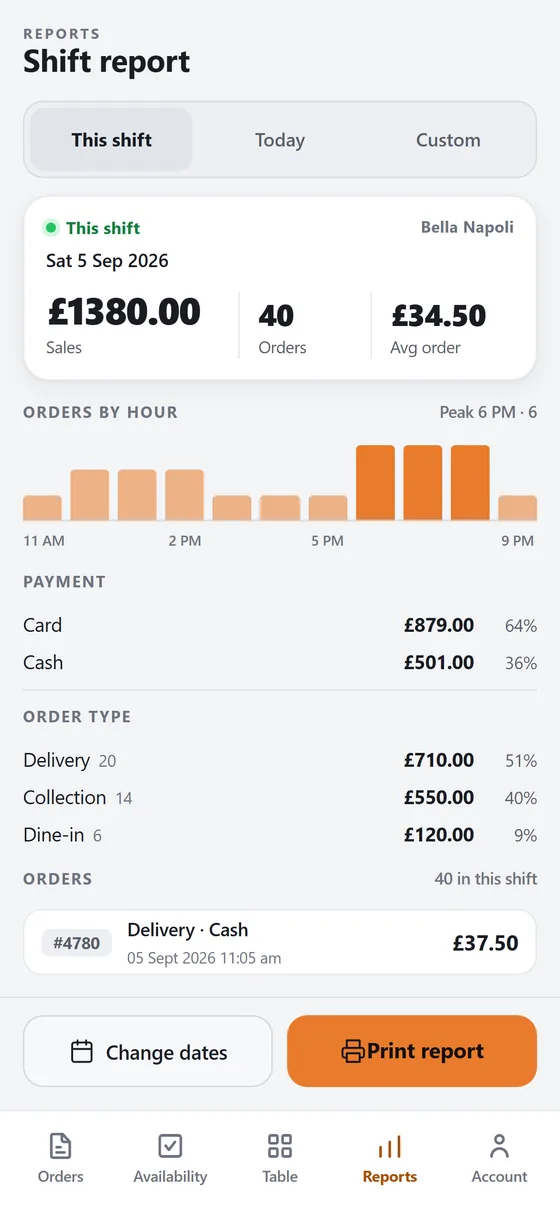
At close, the shift report is one screen: this shift, today, or a custom range. The shift window is taken from your opening hours rather than a calendar day. Across the top, total sales, order count and average order value. Below, a bar for every hour so you can see where the rush actually landed, then the card-against-cash split and the delivery, collection and dine-in split. Print report sends the whole thing to the same thermal printer as your kitchen tickets, as a Z-read.
- 1Three ranges
this shift, today, or any custom window.
- 2The window follows your opening hours
not midnight to midnight.
- 3Orders by hour
a bar chart of when the orders actually came in.
Also in ZMerchant
The parts you'll use sitting down.
A till for the ones who walk in
Counter and phone orders go through the POS. Create Order gives you a category rail — pizza, starters, desserts, drinks — dish tiles with prices
Tables, rooms, covers and shifts
Table service is a tab of its own. The List view shows every table and booth with its floor and cover count, each marked Available or Unavailable
The rest of it, for when you sit down
Five jobs get used continuously, with your hands full: take the order, accept it, print it, control what is available, close the shift.
Specifications
The hard facts.
- Platforms
- Android and iOS. A phone or a tablet, usually mounted near the pass.
- How orders arrive
- Realtime push, a 15-second poll when realtime is off, and OS push notifications. The board also re-reads itself every 30 seconds regardless.
- Printing
- Bluetooth LE, classic Bluetooth, built-in Sunmi printers and cloud printers. 58 mm and 80 mm paper.
- Staff logins
- Permission-gated. 120 screens can be locked behind a named permission; 113 distinct permission names are in use across twelve feature areas.
- Themes
- Light, dark, or follow the device. Set per device and kept across logout, so a shared login cannot change the pass screen.
- Languages
- English and Greek. All copy comes from translation files, and right-to-left layout is supported.
What it's worth to you
Why this matters commercially.
A missed order is a refund
Every alert path in this app exists because an order nobody hears becomes a cancellation, an angry customer and money back. The alarm repeats until somebody actually deals with it.
A ticket that never printed
If the Bluetooth link drops, the food is never made. Two retries, a queue that survives a restart and a standing banner mean a failed ticket is visible rather than silent.
86 it in five seconds
Selling a dish you have run out of costs you a refund and a review. Availability is one tap from the order board, so it happens during service rather than after it.
ZMerchant questions
Asked on the first call.
What happens if the tablet drops off the network mid-service?
The app watches the connection and routes to a screen that says plainly that order alerts will not reach you while it is down — that sentence is the point of the screen. Kitchen tickets that failed go into a queue that survives a restart. You are not signed out for being in a dead spot: the session is only cleared when the network is up.
Do we need a particular printer?
Four transports are supported: Bluetooth LE, classic Bluetooth, a Sunmi device with the printer built in, and cloud printers the server prints to directly. Paper width is set per printer at 58 mm or 80 mm. Pairing is a ten-second scan from the printer list, and the record — name, address, model, paper width — saves to your account, so a replacement tablet already knows it.
Can we turn the alarm down, or off?
The repeat interval is a setting: a per-restaurant value overrides the platform default, and it falls back to twenty seconds. Alerts can be switched off entirely, but the app is built on the assumption that nobody is watching the screen, so silence is the failure mode. The alarm stops on its own once the last new order has been accepted or rejected.
Can staff have their own logins with limited access?
Yes. Access is driven by a permission list attached to the sign-in. 120 of the app's screens can be locked behind a named permission — 113 distinct names across orders, the menu, bookings, POS, reports, drivers, images, invoices and commission — and permissions hide individual controls too, not only whole pages. The list is held on the device, so gates apply before the first network call on a cold start.
See ZMerchant on your own menu.
We import your menu, set your kitchen's own stage names and timings, connect your gateway and run a full evening alongside whatever you use now. If it doesn't hold up on a Friday, it isn't ready.