Customer ordering · your own domain
Your customers order from you, not a marketplace
ZCustomer is the ordering app your customers actually use — menu, basket, checkout, payment and live order tracking, on your own web address. It installs to the home screen without an app store, and every total is worked out by your server, never by the phone in their hand.
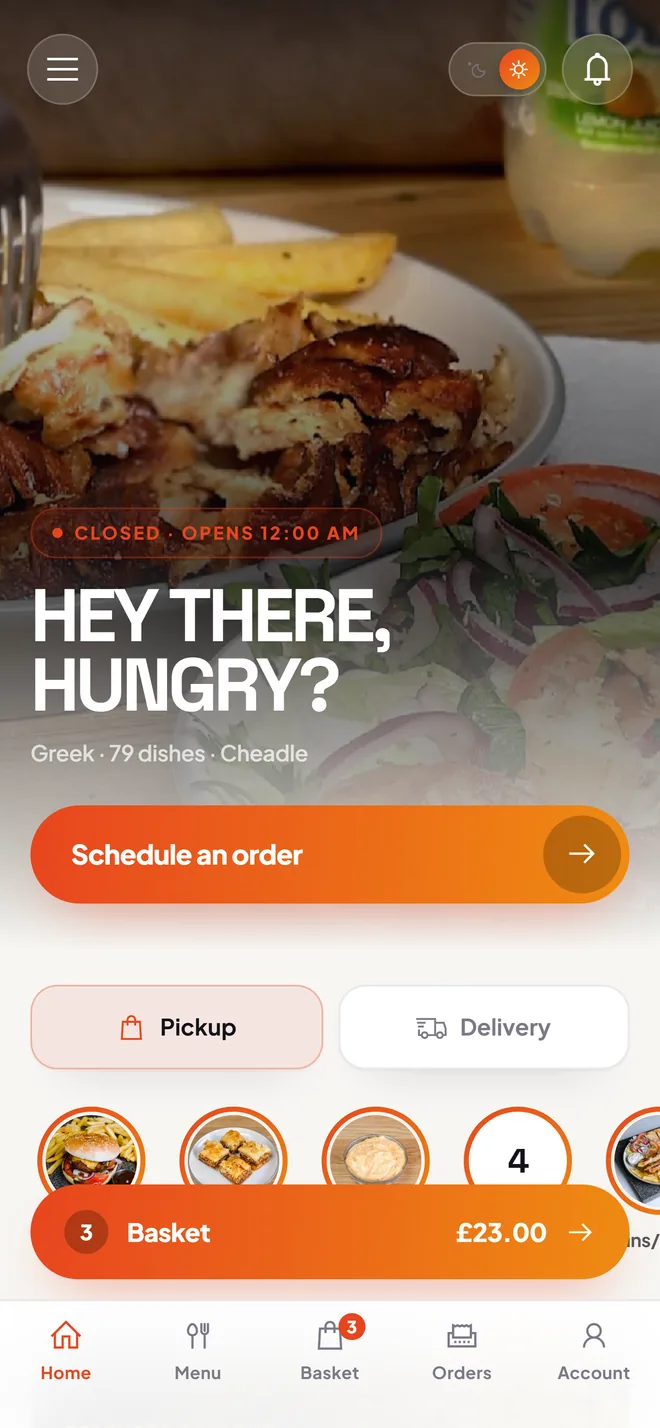
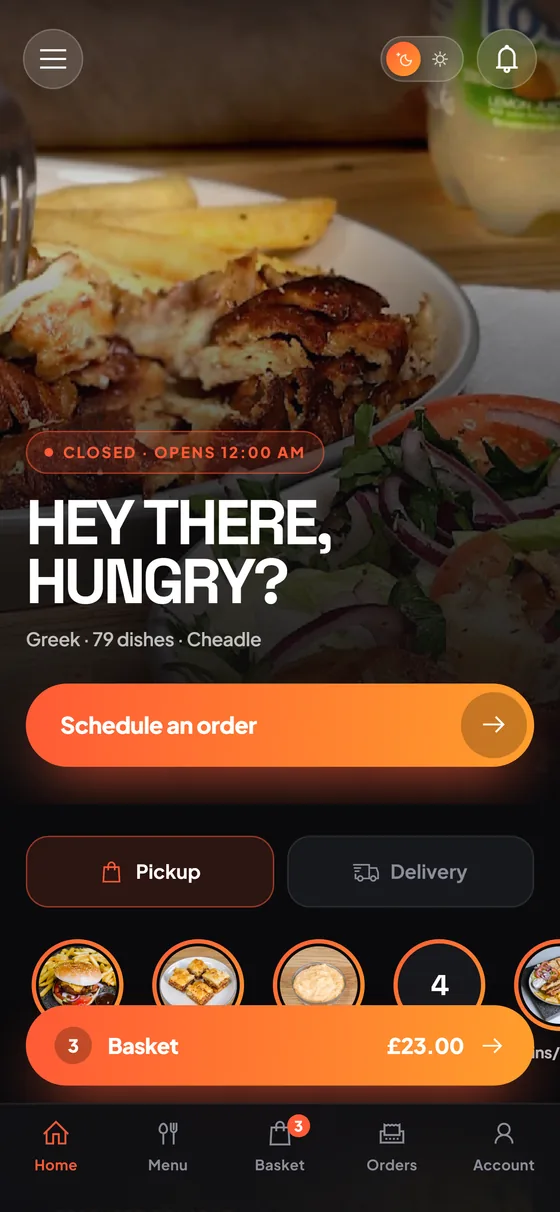
Pickup and delivery toggle
the choice sits on the first screen, not three taps into checkout
Schedule an order
a customer can set a later slot without leaving the home screen
Live basket bar
the running total follows the customer across every screen
The core of it
Your front door, not a marketplace listing
The first screen is yours — your photography, your logo, your opening hours. Customers switch between pickup and delivery with one tap, or tap Schedule an order to choose a later slot before they have even opened the menu.
- 1Pickup and delivery toggle
the choice sits on the first screen, not three taps into checkout
- 2Schedule an order
a customer can set a later slot without leaving the home screen
- 3Live basket bar
the running total follows the customer across every screen
Features
What ZCustomer does during service.
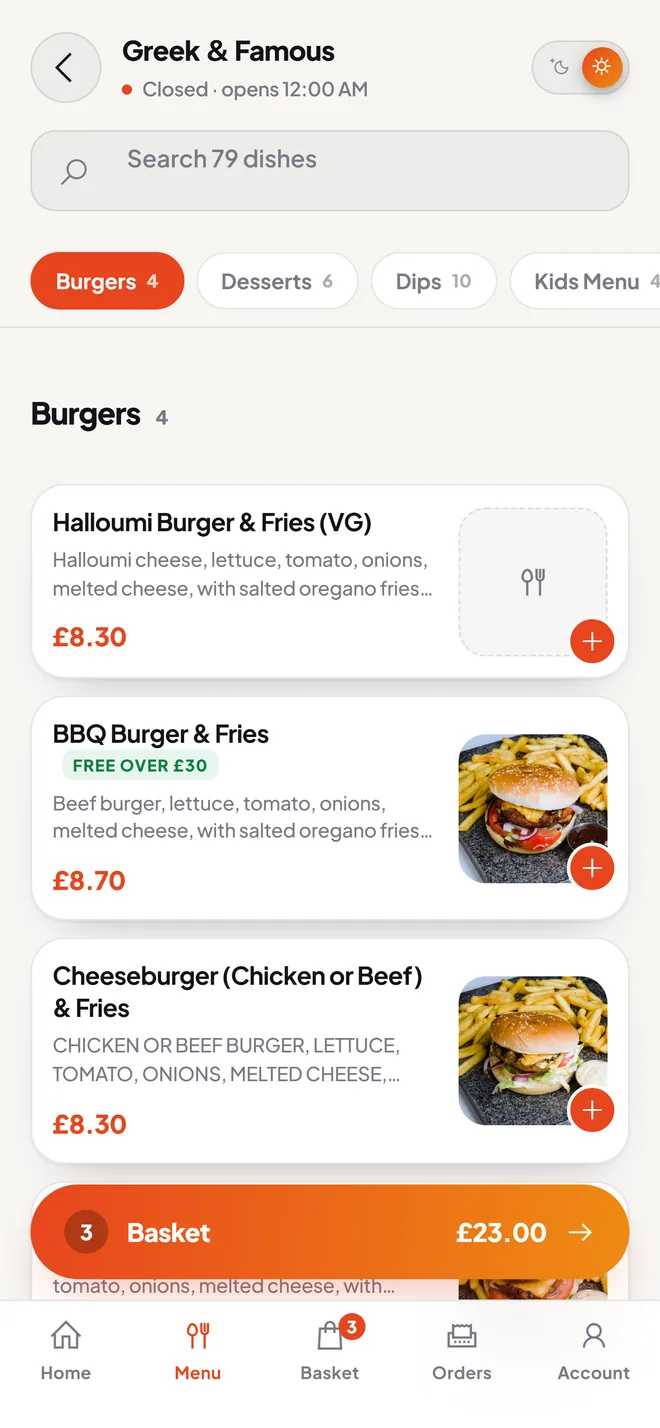
The whole menu, sizes and allergens included
The menu screen carries your full card — the restaurant shown here runs 79 dishes. Category chips carry a count, so nobody hunts for a section holding two items, and search runs across the whole menu rather than the part currently on screen. Each card shows the description
- Search the whole menu — one field across every dish, not just the visible category
- Counts on every category chip — Dips 10, Desserts 6, so the shape of the menu is obvious
- Sizes and add-on groups — the customer picks options, your server prices the combination
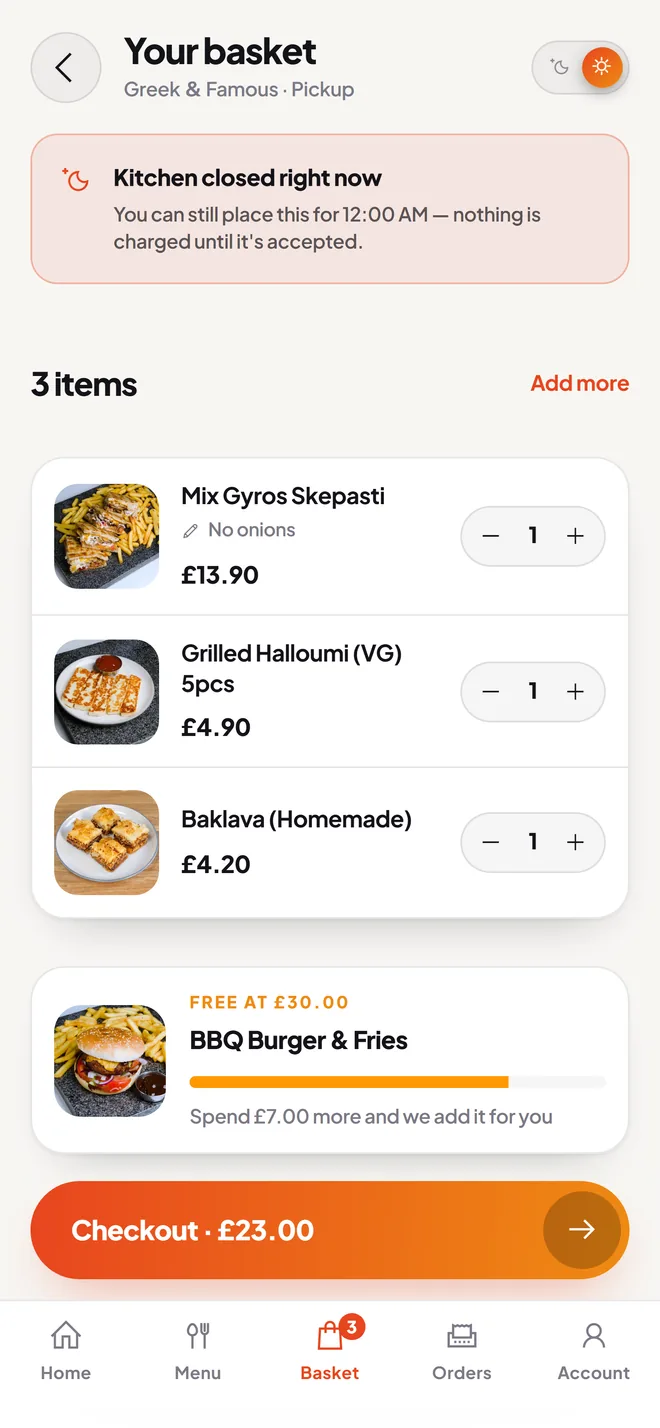
A closed kitchen stops losing you orders
The basket lives on your server, not in the browser. Every change is posted and re-read, so what the customer sees is what your kitchen will receive. If you are shut, the basket says so plainly and offers the next opening slot instead of dead-ending — "you can still place this for 12:00 AM
- Orders while you are closed — the basket offers the next slot rather than turning the customer away
- Nothing charged until you accept — on Revolut the money is authorised and held, then captured on acceptance
- Spend-more progress bar — "spend £7.00 more and we add it for you", not a vague nudge
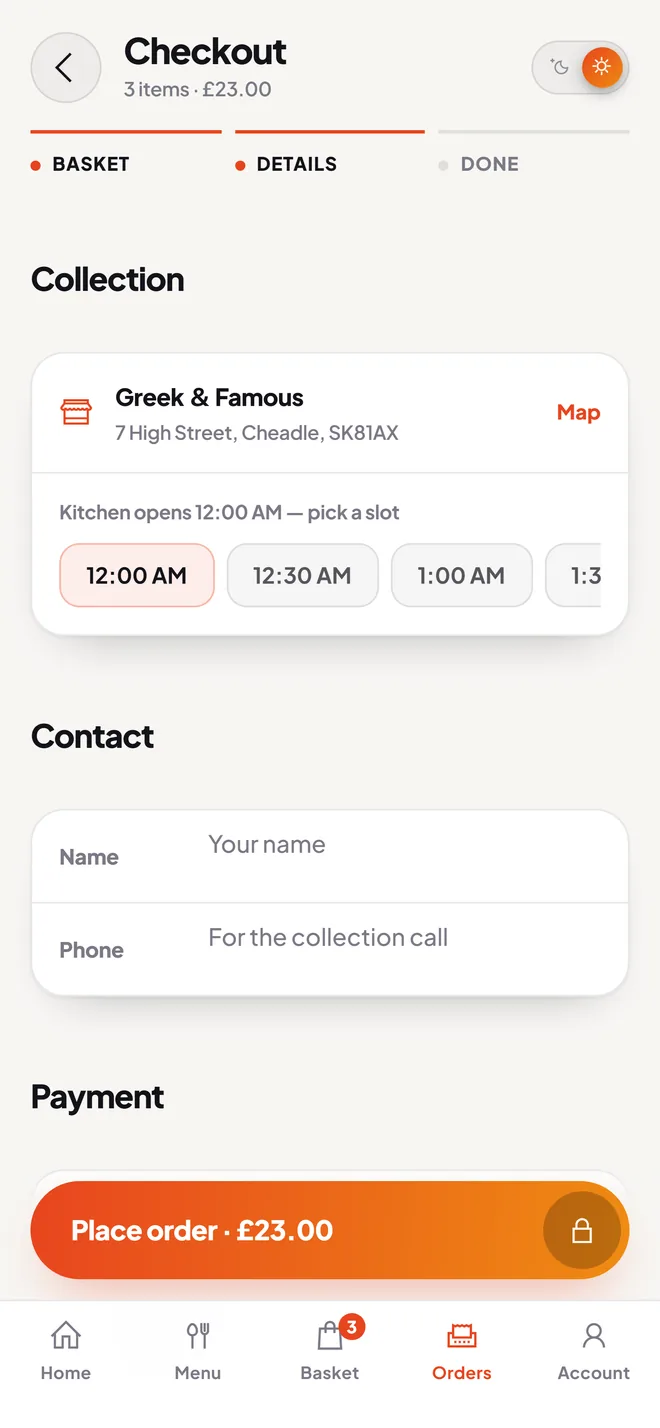
The total comes from your server, not the phone
Checkout is three steps — basket, details, done. The customer confirms the collection address or delivery place, picks a time slot from your trading hours, fills in contact details and chooses how to pay.
- The app never sends a total — Place order posts a cart id and a payment choice; your server prices it
- Promo codes, tips and points — the customer selects, the server recomputes and returns the new total
- Duplicate-order guard — a failure after the order exists retries payment on that order instead of creating a second one
Installs to the home screen, no app store
ZCustomer ships as an installable web app. A customer opens your link, taps Add to home screen, and gets an icon that opens full-screen with no browser bar. There is no download
- No app store gatekeeper — menu and price changes go live when you publish them
- One build, every device — iPhone, Android and desktop browsers run identical code
- Dark theme — follows the phone's system setting, with no toggle to explain
In depth
Accounts you own, guests you don't lose
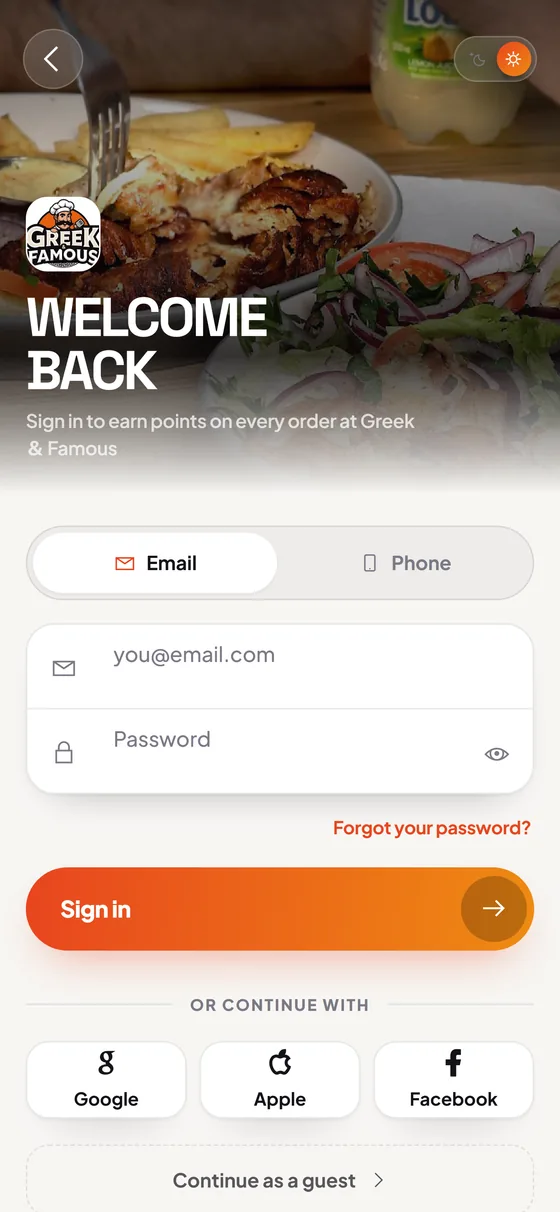
Customers can sign in with email or phone, or with Google or Facebook, with one-time codes and two-step verification available. They can also skip all of it — guest sign-up lets a first-time customer finish an order without creating anything, which is where most abandoned baskets go. An account then carries saved addresses, saved payment methods, order history, buy again, wallet balance with top-ups, loyalty points and favourites. Customers can delete their account from inside the app. All of it sits in your database rather than a marketplace's.
- 1Guest checkout
no sign-up wall between a first-time customer and their first order
- 2Buy again
a regular rebuilds a previous order from their history in one tap
- 3Wallet and loyalty points
both spend at checkout, with balances held server-side
Specifications
The hard facts.
- Order types
- Delivery, pickup and dine-in, each with its own addresses, time slots and rules.
- Payment routes
- Nine gateways wired in: Revolut (card, Apple Pay, Google Pay), Stripe, PayPal, Razorpay, Mercado Pago, bank transfer, cash on delivery and pay on collection. Wallet balance and loyalty points also spend at checkout.
- Languages
- English and Greek throughout, checked key-for-key so nothing drops back to English mid-screen. Multi-currency.
- Platforms
- One build: iPhone, Android and desktop browsers, plus optional native iOS and Android wrappers.
- How it installs
- The customer opens your link and taps "Add to home screen". No app store, no download, no review queue.
- Branded app store listing
- Your own iOS and Android app is a £9.99/month add-on. The web app is included in every plan.
What it's worth to you
Why this matters commercially.
The commission stays yours
On a £45 delivery order, a 30% marketplace fee is £13.50. Every order that moves onto your own app keeps that money in the business instead of a middleman's.
You keep the customer
Names, phone numbers, delivery addresses and full order history sit in your own database. You can ring a lapsed regular with an offer. A marketplace will never hand you that number.
Rejected orders cost you nothing
With Revolut the customer's money is authorised and held, then captured only when your kitchen accepts. Reject a job you cannot cook and the hold is simply released.
ZCustomer questions
Asked on the first call.
Do our customers have to download an app?
No. ZCustomer is an installable web app — they open your link, browse and order straight away. If they want the icon, they tap Add to home screen and it opens full-screen with no browser bar. If you want a proper App Store and Play Store listing under your own name, that is a £9.99/month add-on. The web app itself is included in every plan.
What happens if someone orders while the kitchen is shut?
The basket tells them plainly and offers the next opening slot instead of refusing the order. They pick a time and place it, and on Revolut the money is authorised but not taken — nothing is captured until your kitchen accepts it. You come in to a queue of pre-placed orders rather than a night of lost ones.
Could a customer edit the price in their browser?
No. When they press Place order, the app sends your server a cart identifier plus their choices — no price, no subtotal, no total. Your server looks up every item and add-on price from its own database, works out the figure and charges that. Tips, promo codes, loyalty points and wallet balance are all recomputed server-side the same way.
Which payment methods can we take?
Nine routes are wired in. Revolut covers card plus Apple Pay and Google Pay through its hosted checkout; Stripe, PayPal, Razorpay, Mercado Pago and bank transfer are also supported, alongside cash on delivery and pay on collection. Customers can also spend wallet balance or redeem loyalty points. You decide which of these appear at your checkout.
See ZCustomer on your own menu.
We import your menu, set your kitchen's own stage names and timings, connect your gateway and run a full evening alongside whatever you use now. If it doesn't hold up on a Friday, it isn't ready.