The screen at the pass
Read your whole service in one glance
Every order lands on one board the moment it is placed, colour-banded against your own timing targets and moving from New to In Progress to Ready on its own as your cooks work the lines. One tap moves a ticket on. Thirty seconds to undo it.
Tickets move themselves
nothing started is New, one line off the first step is In Progress, every live line finished is Ready.
Service Pulse, not a guess
percentage on time, live caution and late counts, the oldest order, and the oldest one nobody has started yet.
A clock per service
elapsed time is judged against the targets set for that service type, so delivery and dine-in are not held to the same number.
The core of it
Every open order, in three columns
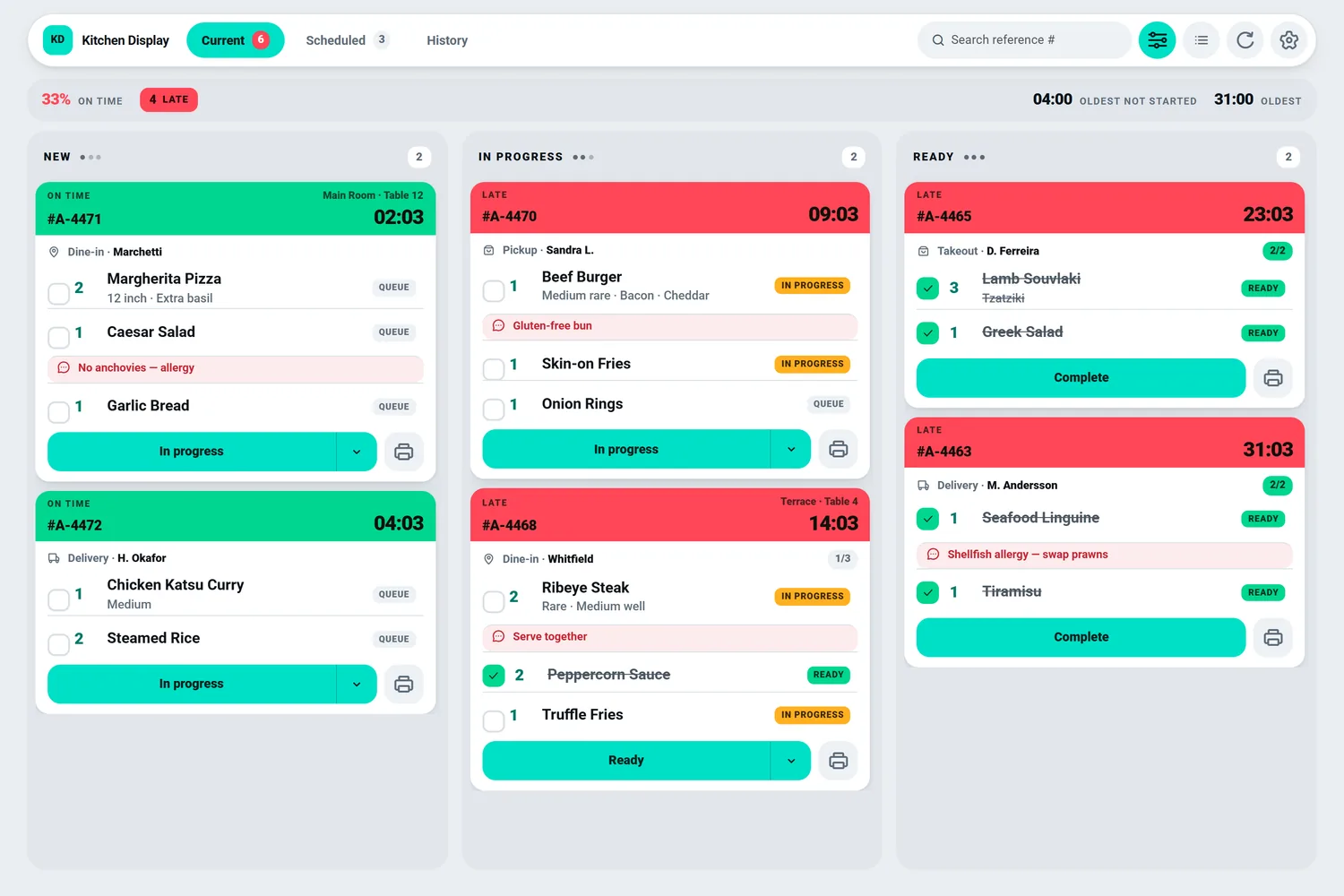
The board is the product: one view, three columns, nothing to configure about it. Every open order is a ticket carrying its reference, service type, customer name and table, then one row per line with quantity, product, options and add-ons
- 1Tickets move themselves
nothing started is New, one line off the first step is In Progress, every live line finished is Ready.
- 2Service Pulse, not a guess
percentage on time, live caution and late counts, the oldest order, and the oldest one nobody has started yet.
- 3A clock per service
elapsed time is judged against the targets set for that service type, so delivery and dine-in are not held to the same number.
Features
What Kitchen Display does during service.
One tap forward, thirty seconds back
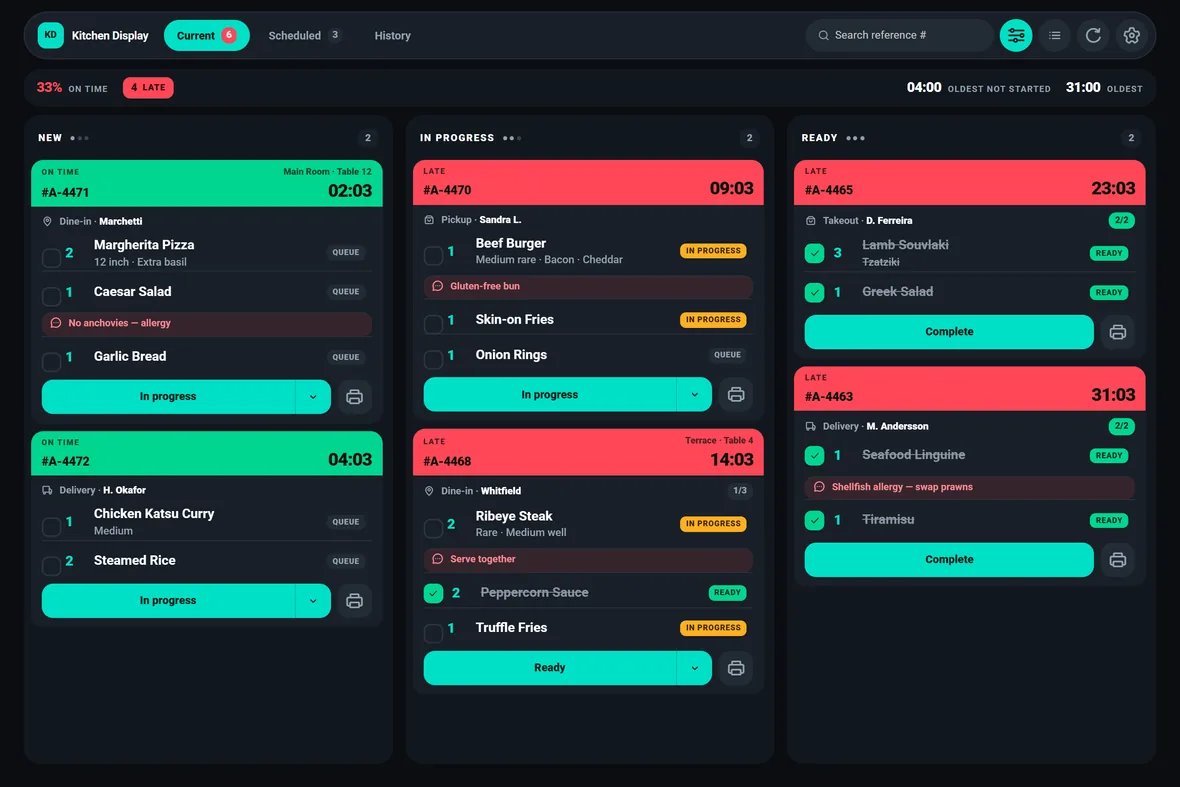
The primary button on every ticket advances it one step along your pipeline, and it is labelled with the status it will actually apply. A ticket's stage is taken from its least advanced line
- Your status names, not ours — the stages, their order and their wording come from your own kitchen-status configuration.
- Undo is a real un-bump — a chip sits on the board for thirty seconds after any completion and runs the same recall History offers.
- Tick lines to move part of an order — with lines ticked an action applies to exactly those lines; with none ticked, to the whole order.
Total every dish still to make
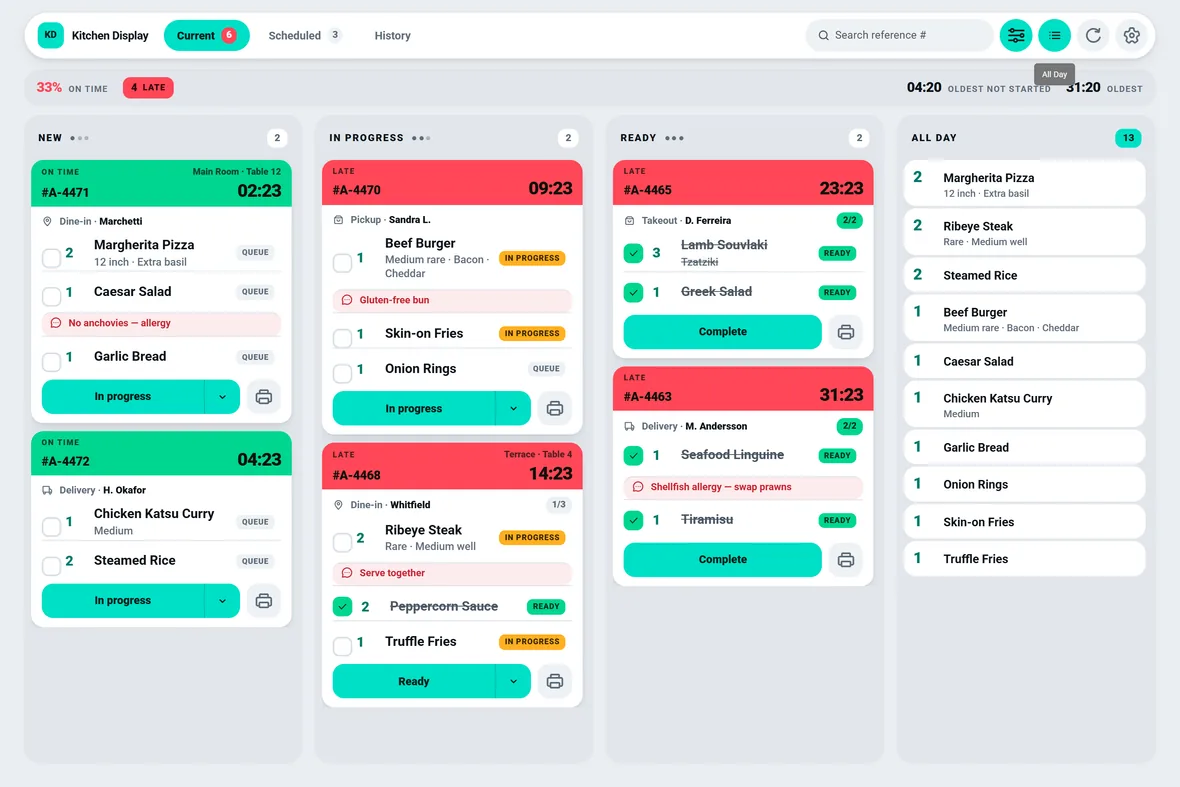
Sometimes the question is not "what is on this ticket" but "how many of those am I cooking in total right now". The All-Day toggle opens a rail beside the columns that sums every outstanding line across the whole board into one prep list — make nine burgers
- Summed by product — outstanding lines across every open order, collapsed into a single list.
- Options stay separate rows — two differently-cooked ribeyes do not merge into one number of two.
- A station view without a station setup — the grill reads the rail instead of counting across tickets.
New orders cannot slip in unnoticed
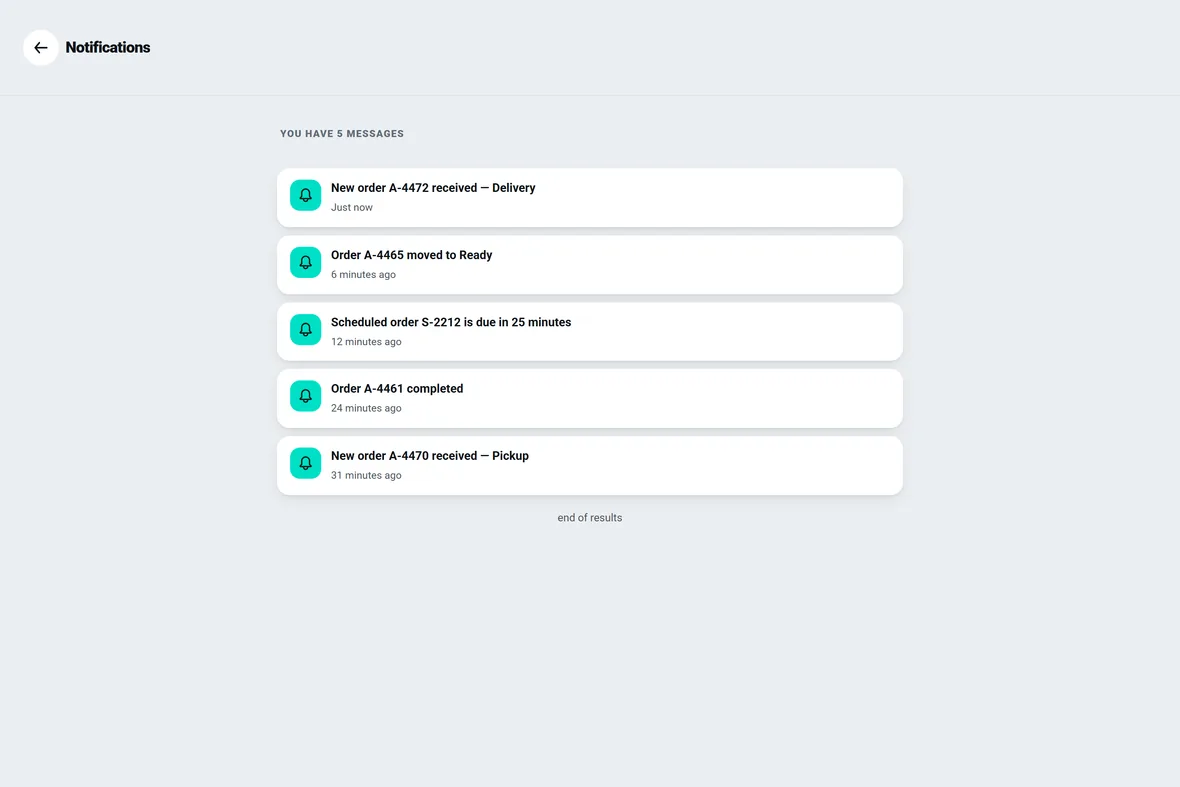
Orders arrive over a live channel scoped to your restaurant, so a ticket lands the moment it is placed — no refresh, no waiting. But an order that arrives while nobody is looking is otherwise indistinguishable from the dozen already sitting in New, and the pop-up that announced it is long gone.
- Acknowledge by working — tapping the strip clears the ring, and so does ticking a line, advancing the ticket, or printing it.
- A chime you can actually test — the Test button reports whether the sound played or was blocked, rather than doing nothing visible.
- Browsers need one tap — the first touch anywhere unlocks audio for the session; the Android app uses the platform's own audio.
Tonight's booking, not on today's board
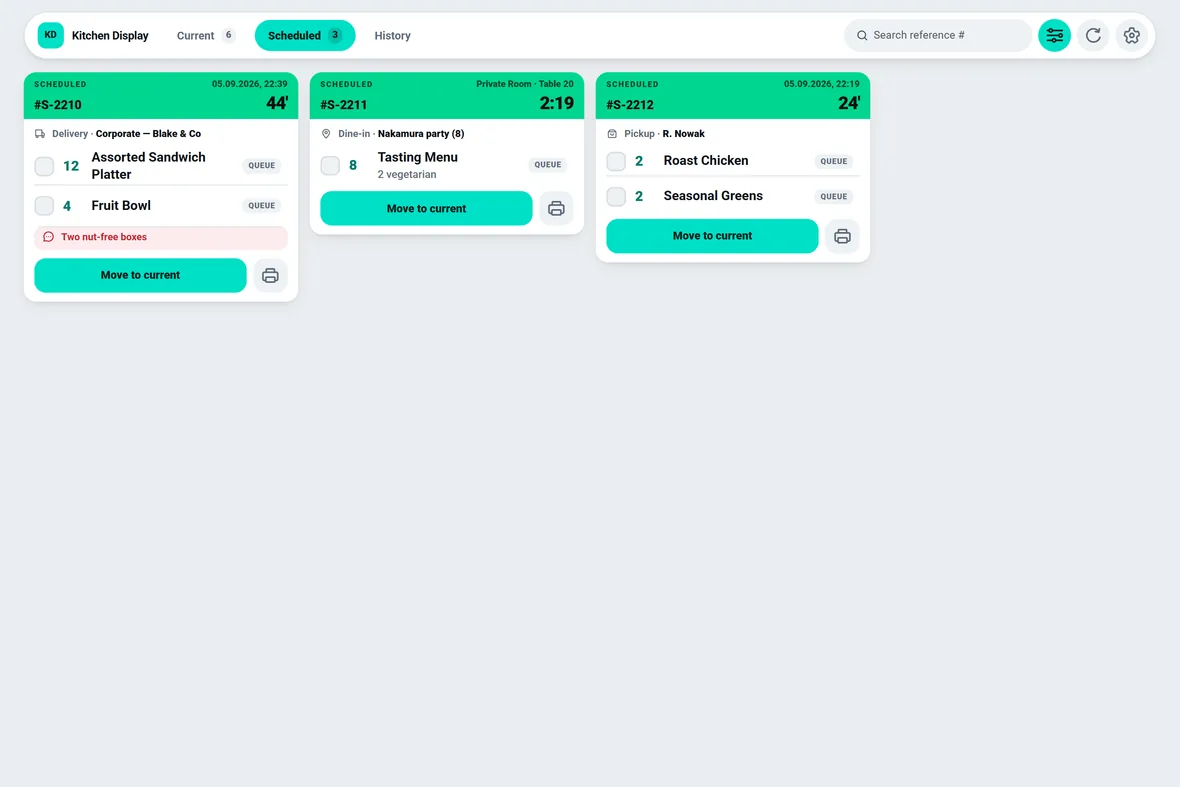
Pre-booked orders get a screen of their own, so a party of eight at seven does not sit on the live board all afternoon. They are listed as read-only tickets counting down to their promised time and judged against when they are due
- Counting down, not up — a scheduled ticket reads Scheduled rather than On Time, because a booking for later is not a verdict on anyone's perform…
- Move to current — pull any booking onto the live board early with one tap.
- Automatic promotion — set how many minutes ahead of its promised time a scheduled order rolls onto the board on its own.
In depth
A calm screen, and one that never blanks
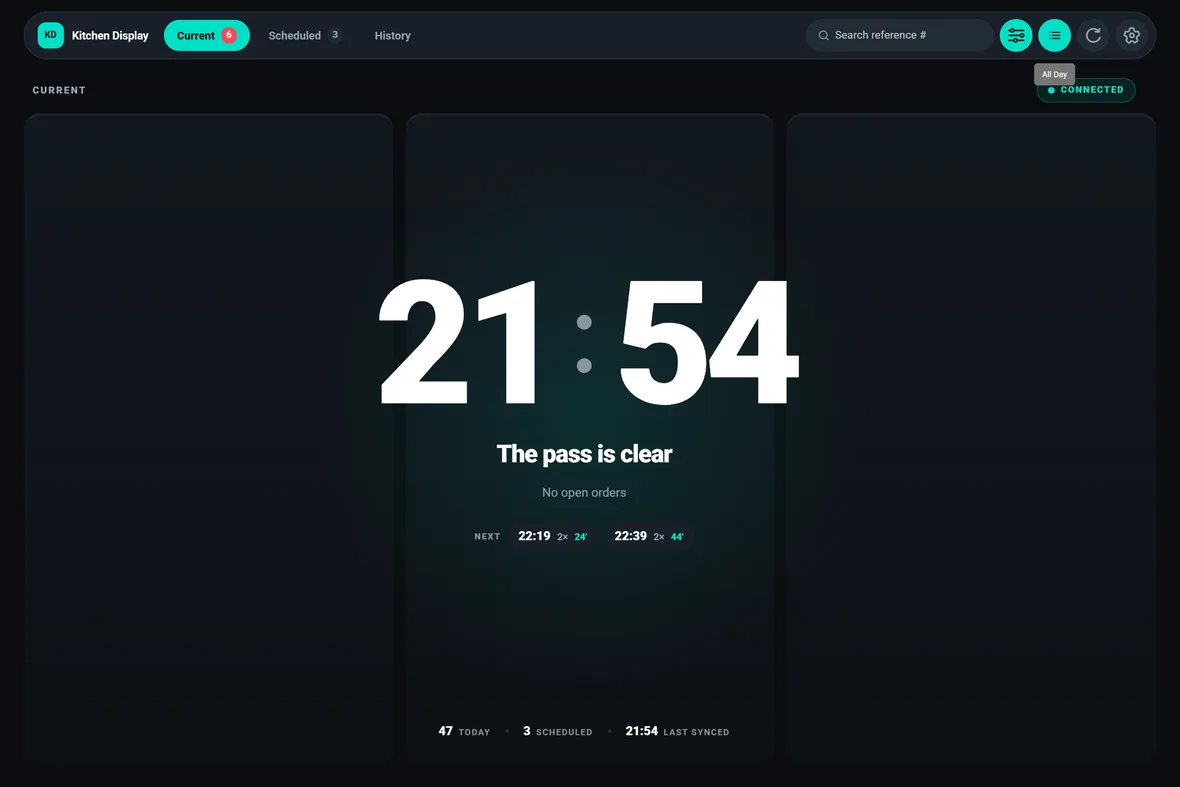
An empty board is not an error. It is the only quiet moment in a service, and on a wall screen it can last twenty minutes. So the idle screen reads as a settled state: a large clock, how many orders you have handled today, what is still scheduled, and the promised times of the next few bookings. After a few seconds clear, the chrome withdraws and the panel goes full-bleed; a tap brings it back and any incoming order cancels it immediately. The panel drifts a few pixels over several minutes so bright glyphs do not burn into an always-on display.
- 1The board never blanks
a failed read keeps the last good tickets on screen rather than clearing them.
- 2Staleness is stated, not hidden
a Connected / Reconnecting pill flips after a couple of missed cycles, and the last-synced time stays on screen.
- 3Quiet is not the same as offline
an empty answer from the server counts as contact, so a slow night does not sit on Reconnecting.
Also in Kitchen Display
The parts you'll use sitting down.
Look up anything you have closed
History is a paged table of everything the kitchen has completed, newest first — reference, customer
Paper when you want it, logged when it fails
Reprint a whole ticket from any order card and it goes straight to the printer set to auto-print, rather than opening a picker mid-service.
Your colours, your timings, your words
Settings is a dialog over the board, not a destination, so changing the theme never costs a navigation away from service.
Specifications
The hard facts.
- Board layout
- Three live columns: New, In Progress, Ready
- Undo window
- 30 seconds to recall a completed ticket
- Unacknowledged alert
- Chime repeats roughly every 45 seconds
- Board refresh
- Live push, plus a 20-second safety-net re-read
- Printers
- Bluetooth and network thermal, plus cloud; 58mm or 80mm
- Runs on / languages
- Android tablet, phone or browser · English and Greek
What it's worth to you
Why this matters commercially.
Fewer comped covers
A ticket running hot shows on the band and in the Service Pulse before a customer asks about it, so the fix is a word to the section rather than a refund.
No order lost to a printer
Every print attempt is logged with its outcome, including the automatic ones nobody was watching, so a jam becomes a retry from the tray instead of a missing dish.
Hardware you already own
It runs as an installable Android app on a wall-mounted tablet or as a browser app on the screen you have, from one codebase, so there is nothing bespoke to buy or maintain.
Kitchen Display questions
Asked on the first call.
Do we have to use New, In Progress and Ready as our status names?
No. The stages, their order and their display names come from your own kitchen-status configuration, so the board tracks the workflow and the vocabulary your kitchen already uses. New, In Progress and Ready are the three columns tickets sort into; the statuses that move a ticket between them are yours. Anything the app does not recognise falls back to the wording the server sends rather than an assumed English word.
What happens when the kitchen wifi drops?
The board never blanks. A failed read keeps the last good tickets on screen, because losing every ticket to one dropped request would be far worse than showing slightly stale ones. The freshness pill switches to Reconnecting once a couple of refresh cycles have been missed, the last-synced time stays visible, and the app keeps retrying. When the connection returns, the orders re-read on their own.
Someone completed the wrong order. Can we get it back?
Yes, two ways. A chip appears on the board for thirty seconds after any completion, offering to recall that ticket — a mis-tap on a wall screen is one tap to reverse. After the window closes, open History, find the row and use Recall: it returns the order to the live board. Recall is only offered on rows the server confirms can be recalled.
What do we need to run it at the pass?
An Android tablet on the wall, a phone, or any modern browser — it ships as an installable Android app and a browser app from one codebase, so the same display runs on either. Add a Bluetooth or network thermal printer if you want paper tickets, or use cloud printers driven through the backend. The interface runs in English or Greek, set per device.
See Kitchen Display on your own menu.
We import your menu, set your kitchen's own stage names and timings, connect your gateway and run a full evening alongside whatever you use now. If it doesn't hold up on a Friday, it isn't ready.